

Extract Data from Documents
Document Data Extraction Suite

Typed schema, not free-form prompts
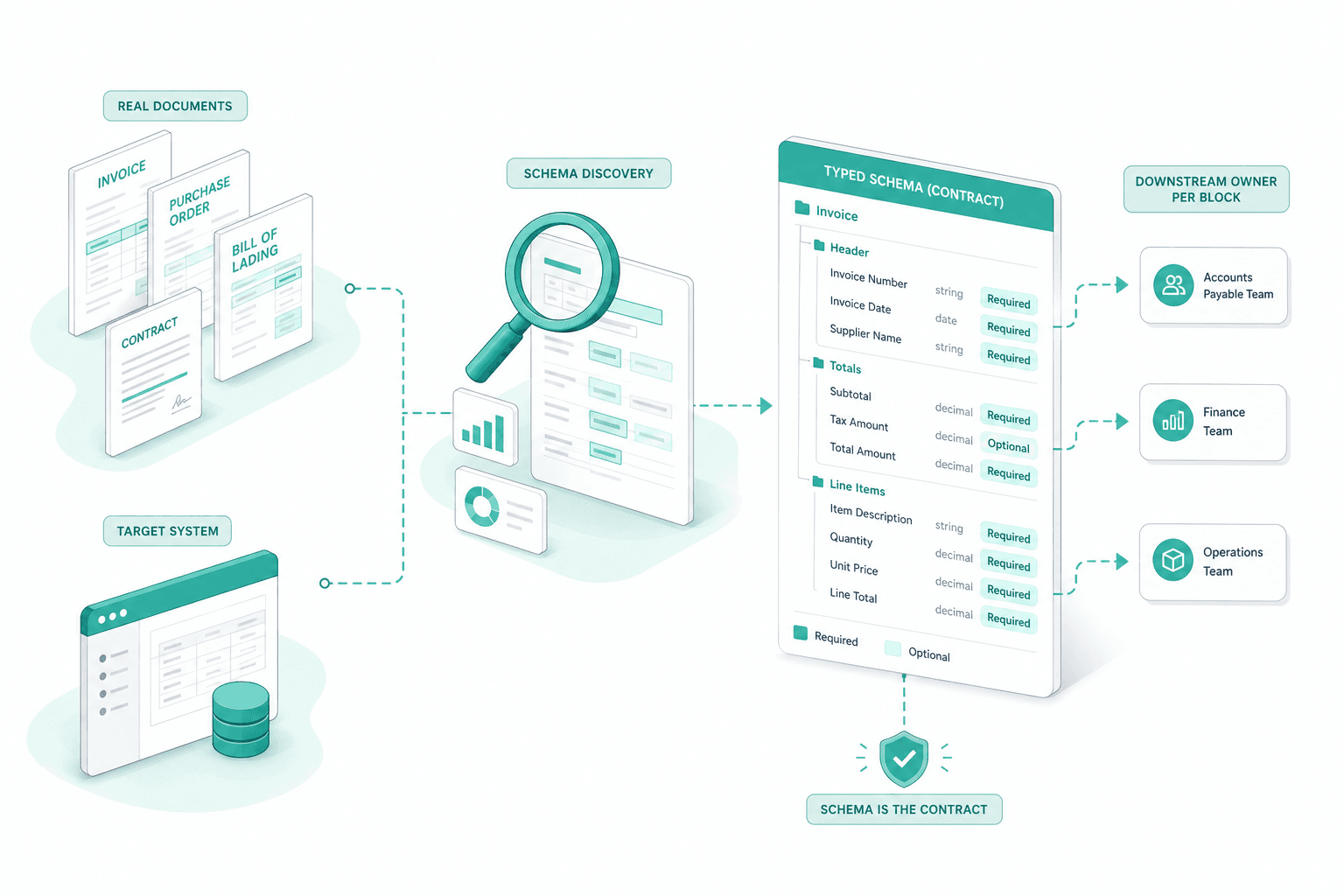
Extraction is bound to a typed Category, SubCategory, FileBlock and Field schema. Each field has a type, a required-or-optional flag, and a downstream owner. The LLM is forced to fill that shape — not to write prose about the document. The ERP, PIM or case-management on the other side gets data it can validate before it stores it.
OpenAI JSON-mode against the schema
The extractor runs in OpenAI JSON mode and is constrained by the field definitions on disk. Missing fields stay null, typed fields stay typed, and the model is not allowed to invent keys. The same pattern is in production at Weita; the Insurance AI POC adds a config UI so operations can extend the schema without a developer release.
Two-pass OCR for difficult scans
Before extraction, scanned pages and image PDFs run through Mistral OCR in two passes — raw text first, then a structured pass that preserves tables and columns. Multi-column German invoices, handwritten Belege and noisy faxes feed the same downstream extractor as digital PDFs. No separate pipeline per format.
Field-level confidence and routing
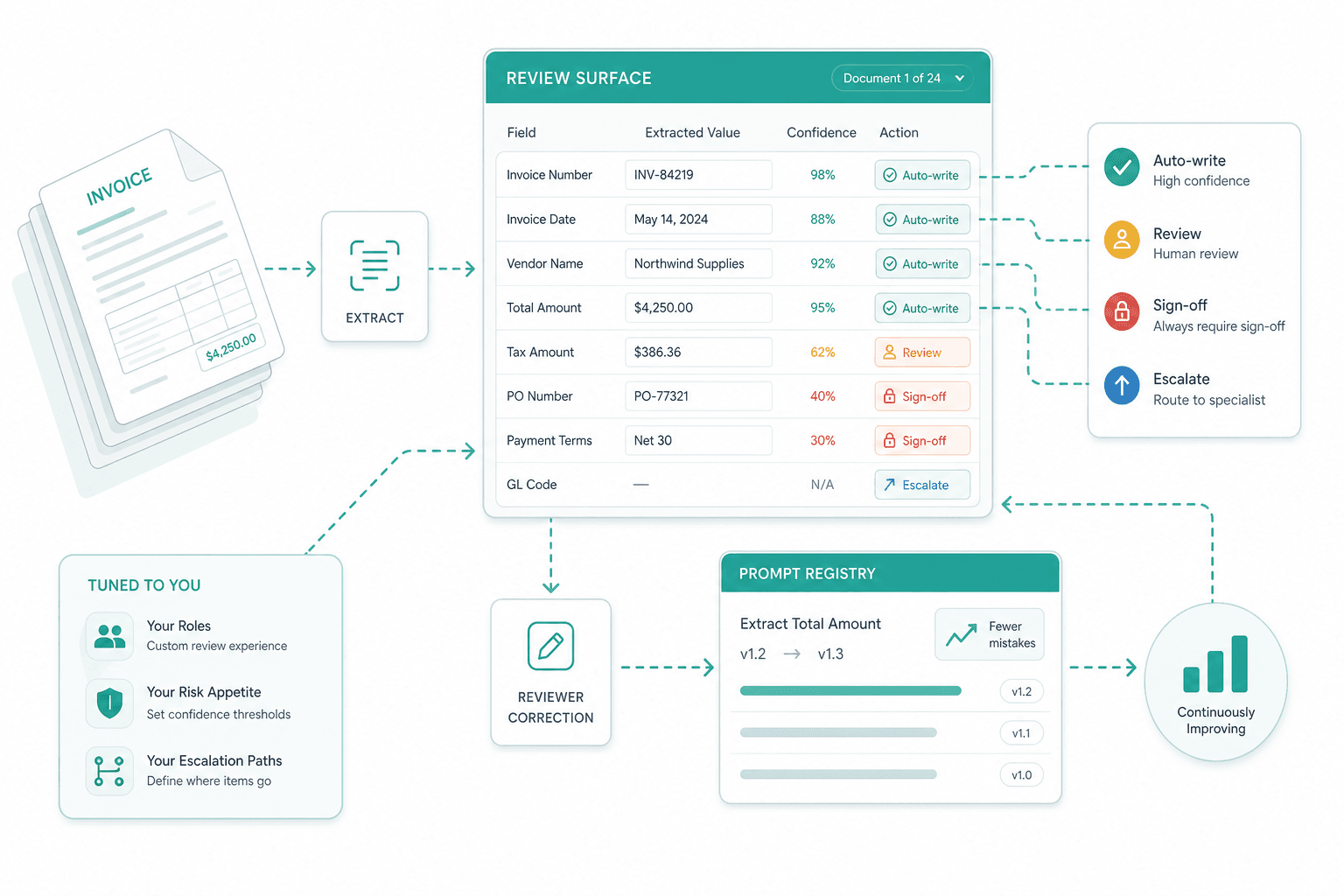
Confidence is tracked per field, not per document. A delivery note with a clean date and an ambiguous total only sends the total to the reviewer — the rest writes through. The reviewer corrects the single value, the document closes, and the correction is captured against the prompt version that produced it.
Staged extraction pipeline with audit
Extraction is a staged Laravel job queue with explicit success and failure states for each stage — PrepareFile, RecognizeImages, ExtractMetadata, ExtractDetails, SaveFile, Notification. Every stage logs the input, the prompt version, the model, the output and the operator. Re-runs after a prompt change are deterministic against the same source file.
New families and fields as configuration
Adding a new document family or a new field on an existing one is admin work, not engineering work. Operations defines the FileBlock and its fields, ties the family to a downstream role and target system, and the next inbound document of that shape flows through. The Insurance AI POC ships this surface for the customer's own administrators.
How we deliver it
Schema discovery against real documents
We start with a representative sample of your real documents and the target system that will store the extracted data. From that we draft the typed schema — categories, file blocks, fields, required vs optional, downstream owner per block. The schema is the contract for the rest of the project.
Pilot extraction on one family
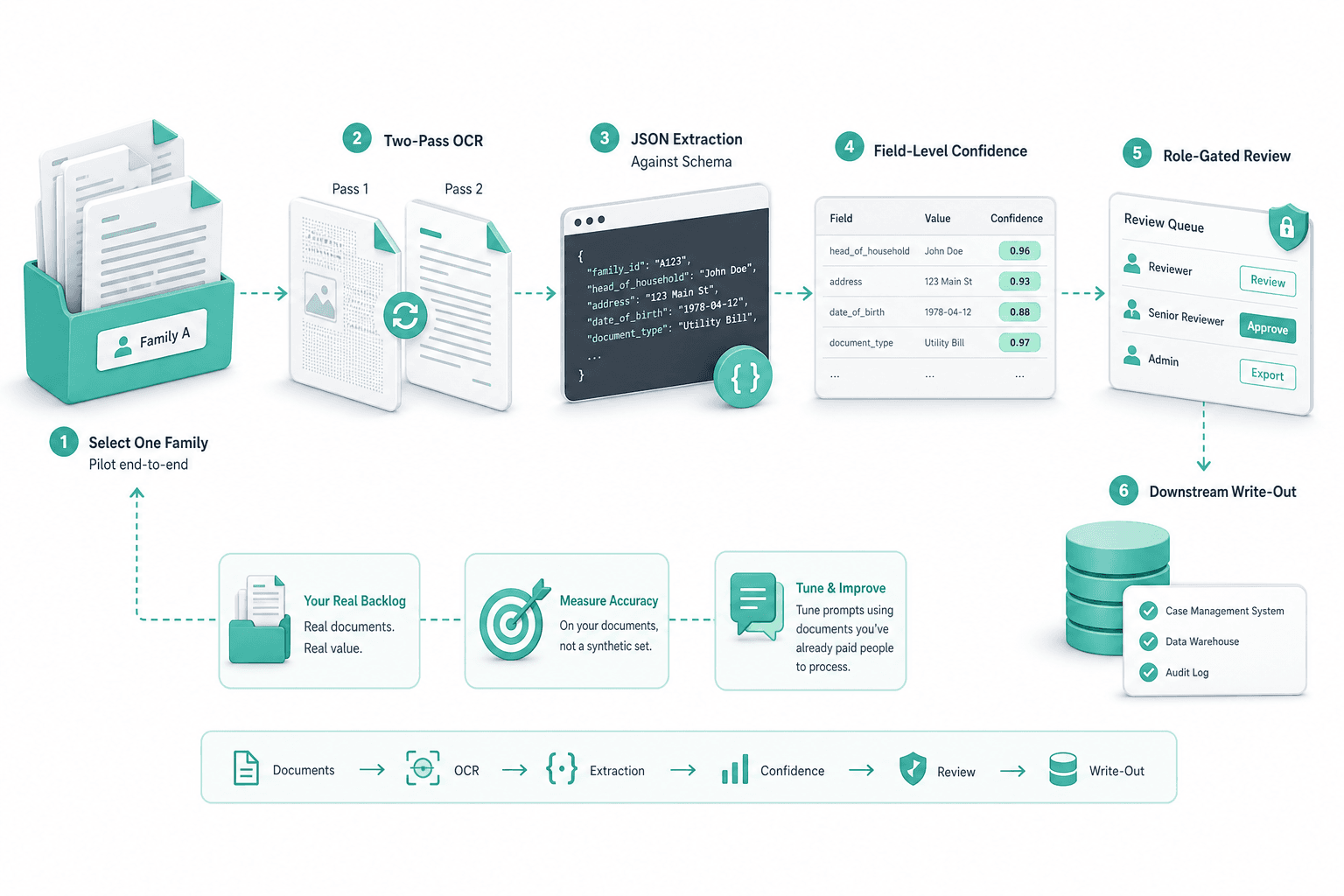
One family goes end-to-end first: two-pass OCR, JSON-mode extraction against the schema, field-level confidence, role-gated review and downstream write-out. We measure accuracy on your real backlog, not on a synthetic test set, and tune prompts against documents you have already paid people to process.
Field-level HITL tuning
We tune the review surface to your roles and your risk appetite — which fields auto-write at which confidence, which fields always require sign-off, where escalation goes. Reviewer corrections feed the prompt registry, so the same mistake gets less common at each prompt version.
Hand-off with prompt registry
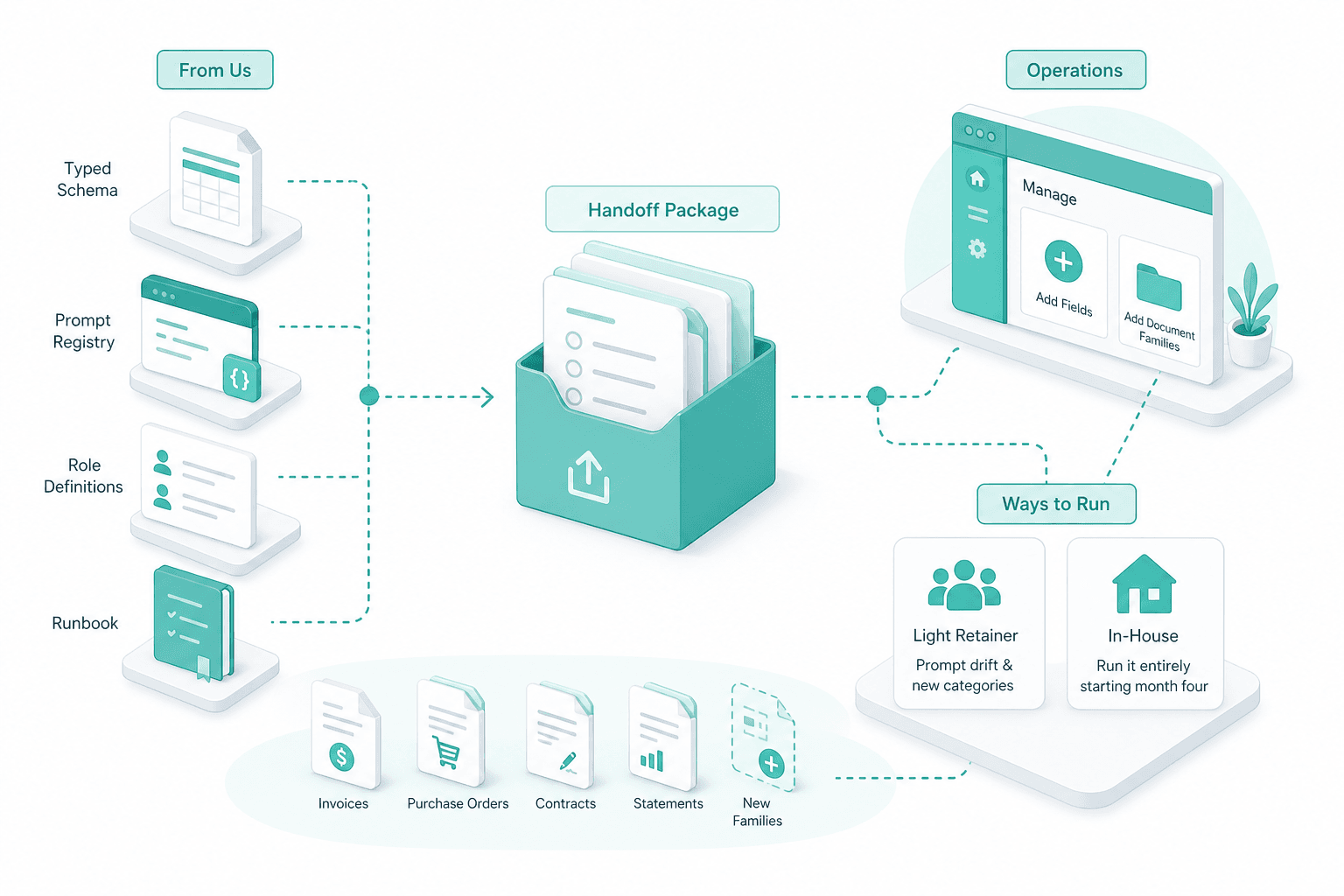
On hand-off we transfer the typed schema, the prompt registry, the role definitions and the runbook. Operations can add fields and document families without us; most customers keep us on a light retainer for prompt drift and new categories, others run it entirely in-house from month four.
We start with a representative sample of your real documents and the target system that will store the extracted data. From that we draft the typed schema — categories, file blocks, fields, required vs optional, downstream owner per block. The schema is the contract for the rest of the project.
One family goes end-to-end first: two-pass OCR, JSON-mode extraction against the schema, field-level confidence, role-gated review and downstream write-out. We measure accuracy on your real backlog, not on a synthetic test set, and tune prompts against documents you have already paid people to process.
We tune the review surface to your roles and your risk appetite — which fields auto-write at which confidence, which fields always require sign-off, where escalation goes. Reviewer corrections feed the prompt registry, so the same mistake gets less common at each prompt version.
On hand-off we transfer the typed schema, the prompt registry, the role definitions and the runbook. Operations can add fields and document families without us; most customers keep us on a light retainer for prompt drift and new categories, others run it entirely in-house from month four.
Selected engagements
SWISS INSURANCE POC
Insurance Document Automation POC for a Swiss Back Office

How SAPIENTROQ built a schema-driven insurance document automation POC for a Swiss back office: Mistral OCR plus OpenAI JSON-mode extraction, schemas generated live from admin-defined categories, with provider-swappable AI behind a single interface.
View Case
SANITAS TROESCH
PIM Implementation with HITL AI for Sanitas Troesch
How SAPIENTROQ delivered a PIM implementation with a multi-agent HITL pipeline that ingests 200k+ supplier SKUs from PDFs, Excel and Jira into the Sanitas Troesch PIM with audit-grade governance.
View Case
Why this engine, not generic data extraction
Schema is the contract, prompts are the implementation
Free-form prompt extraction asks a model to describe a document and hopes the output stays parseable. We invert that: your typed schema is the contract on disk, JSON-mode binds the model to it, and the prompt registry holds the wording of how to ask. When extraction drifts, prompts change as data — not as a code release — and the schema stays stable for downstream consumers.
Confidence at the field, not the document
Document-level confidence forces an all-or-nothing review choice. We track confidence per field, so the reviewer sees only the values that actually need a human and the rest of the record writes through. That is what makes high-volume extraction sustainable for Swiss back-office teams.
Audit-grade by construction
Every extracted value carries its source page, its prompt version, its model identifier and the reviewer if a human touched it. The trail is on by default, not bolted on for a compliance review — and the provenance of each field is what makes regulated Swiss back-office automation something operations actually trusts.
Frequently Asked Questions
OCR converts pixels into characters. Classification decides what the document is. Extraction lifts the specific typed values out of it — invoice total, due date, claim reference, supplier ID — and writes them into the field on the target system. All three usually sit in the same pipeline, but extraction is the step that creates the data your ERP or case-management actually stores.
Free-form prompts force you to parse the model's prose back into fields, and the prose changes shape between runs. A typed schema plus JSON mode pins the output to your field definitions: missing fields stay null, typed fields stay typed, no invented keys. Downstream validation runs against a stable contract instead of a regex over prose.
Each field gets its own confidence signal. High-confidence fields write through to the target system automatically. Low-confidence fields surface in a role-gated review queue — the reviewer sees the cropped page region and the proposed value, edits if needed, and approves. The rest of the record is already saved by the time they touch it.
Yes. Category, SubCategory, FileBlock and Field are admin-defined models. Operations adds the new family or field, ties it to a downstream role and target system, and the next inbound document of that shape flows through. The Insurance AI POC ships exactly this admin surface; Weita exposes a similar surface for prompt and category tuning.
Digital PDFs often need only the raw pass. Scanned pages, image PDFs, multi-column invoices and handwritten Belege benefit from the structured Mistral pass that preserves tables and column boundaries. The extractor consumes the cleaner of the two representations per page, so a single pipeline handles both digital and scanned inputs without a separate code path.
Every extracted value carries its source page, the prompt version, the model identifier and — if a human touched it — the reviewer and the prior value. Failure states are explicit, not silent. For FINMA-supervised, MDR or IVDR-sensitive flows we deploy on Swiss-resident hosting or on-premises; the dedicated vertical pages cover certification posture.
We model extraction as a staged Laravel job queue ending in a write-out stage that targets your system of record. The contract is the typed schema — the downstream system receives the same field shape every time. For Weita that target is a Laravel modular monolith PIM; for the Insurance AI POC it is a case-management database; the pattern carries over to most ERP and PIM systems.
Not on the website. Accuracy and throughput depend on document quality, schema strictness and the HITL threshold the customer wants. We measure both on your real backlog during the pilot family and quote against those numbers. Generic accuracy claims do not survive contact with a real document mix.
About SAPIENTROQ


Interested in a solution?
We are glad to show you various options without any obligation.

Roland Kurmann
CEO, SAPIENTROQ

