

Supplier Onboarding Automation
Supplier Onboarding Suite

Multi-format supplier intake
Suppliers send what they already produce — Excel workbooks, PDF price lists, CSV exports, even email attachments forwarded to a gateway address. Every format lands in the same pipeline, gets normalized to typed rows and queues against your canonical catalog.
AI mapping to your PIM schema
Every supplier names columns differently — Art-Nr, SKU, Artikelnummer, Item Code all mean the same field. The mapper proposes a per-supplier alignment, persists it as a reusable template and applies it to every subsequent file. New columns surface as questions.
PDF price lists to structured rows
Scanned and digital PDFs run through two-pass Mistral OCR — raw text first, then a structured pass that preserves tables and columns. The text feeds OpenAI JSON-mode against your typed schema, so a glossy catalog ends as exactly the same row shape as your Excel intake.
Role-scoped supplier portal
Suppliers log into their own surface — they see and edit only their own rows. Internal catalog managers see everything across suppliers, with admin actions like approve, reject, hold or send-back. Same database, two role-scoped surfaces on Laravel Reverb websockets for real-time collaboration.
Human review on uncertain rows
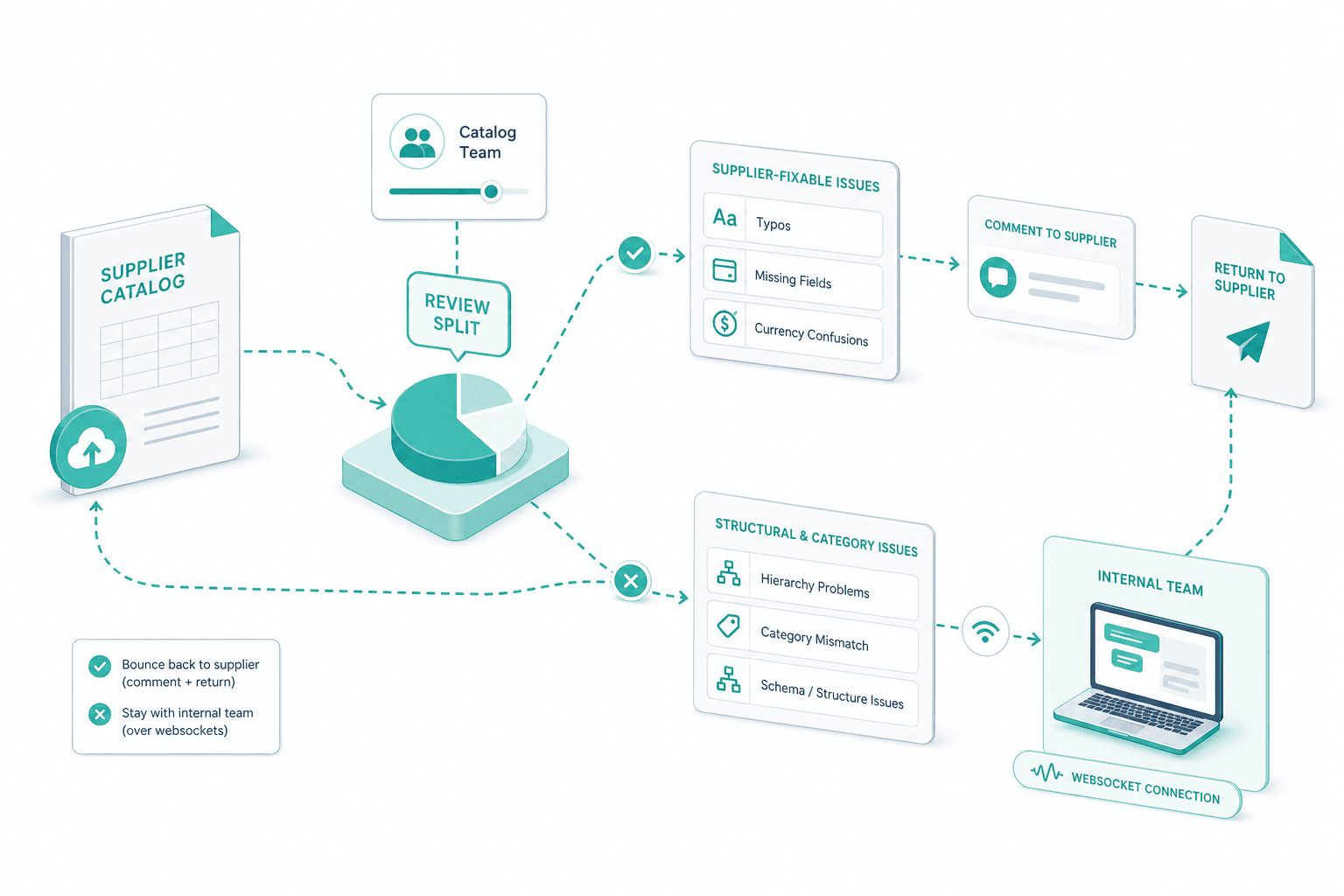
The AI does not write to your PIM unsupervised. Rows with low confidence — ambiguous units, unmapped attributes, unresolved category, suspicious price jumps — surface in a review queue. The split is configurable: light errors go to the supplier, structural errors stay with the internal catalog team.
Push to PIM with audit trail
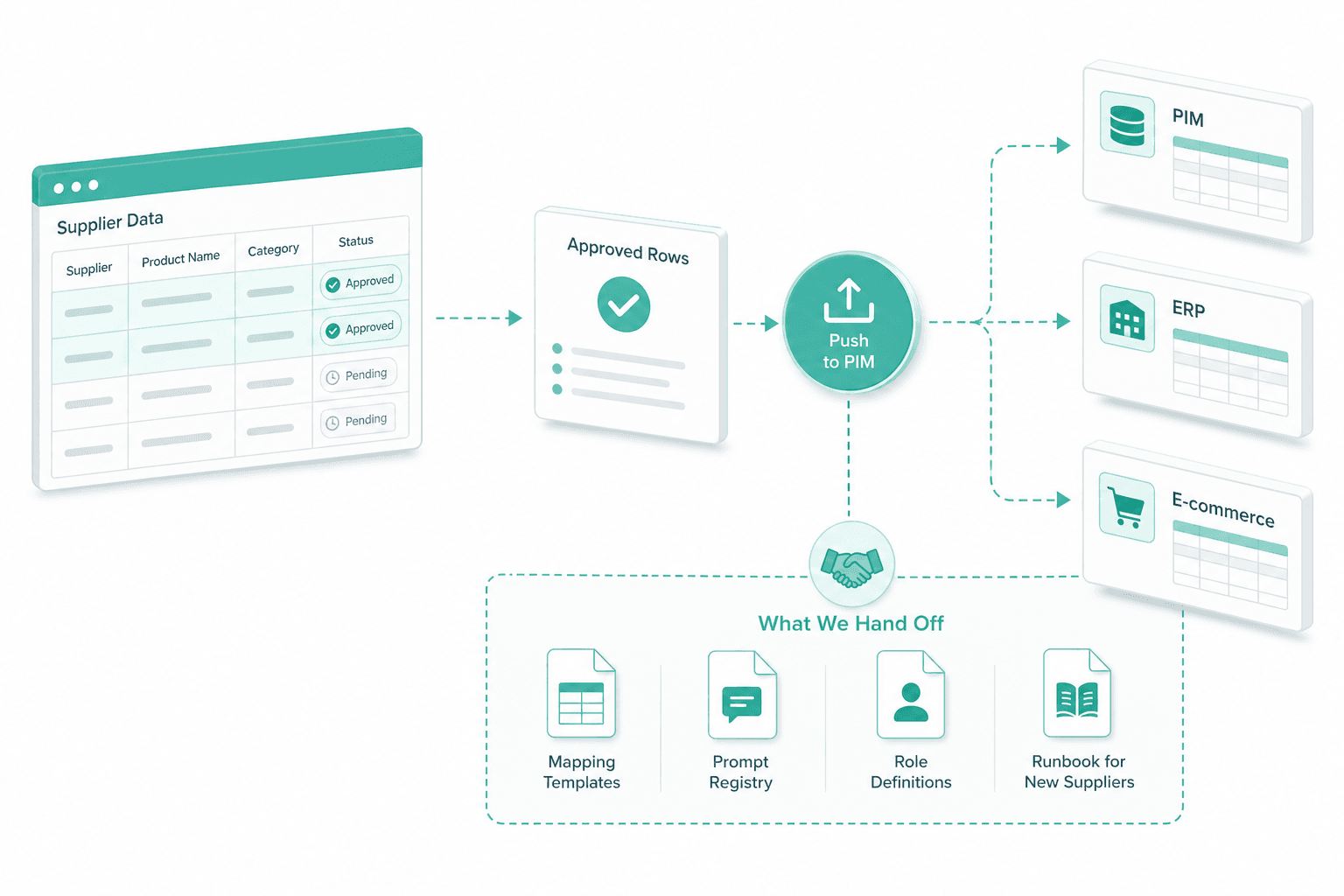
Approved rows write through to your existing PIM, ERP or e-commerce backend on the contract your downstream systems already expect. Every row carries its source file, mapping template version, prompt version and reviewer if a human touched it. Re-runs after a mapping change stay deterministic.
How we deliver it
Supplier inventory
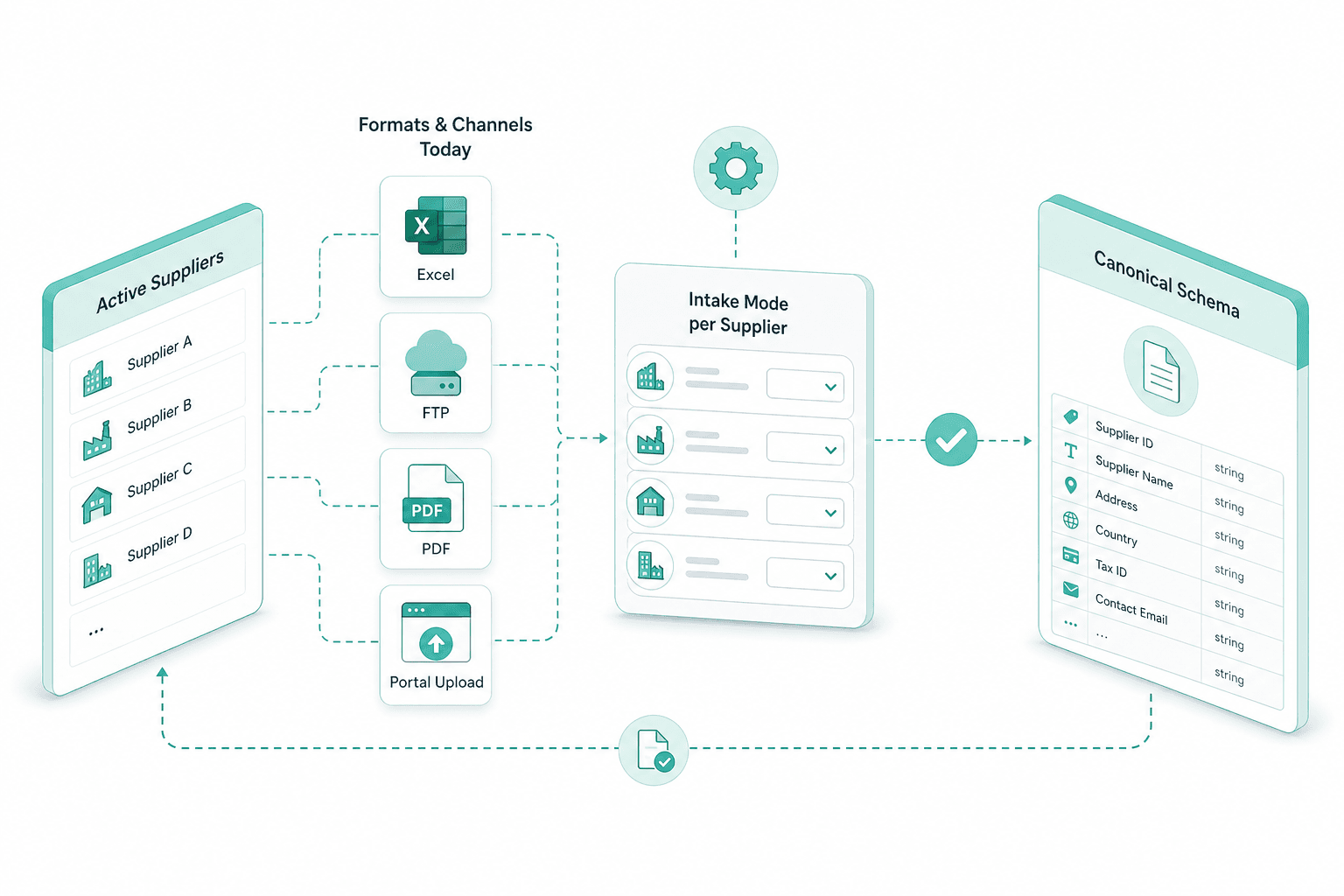
We start from your list of active suppliers, the format each one sends today, and the channel — Excel, FTP, PDF, portal upload. From there we agree the intake mode per supplier and the canonical schema.
Per-supplier mapping
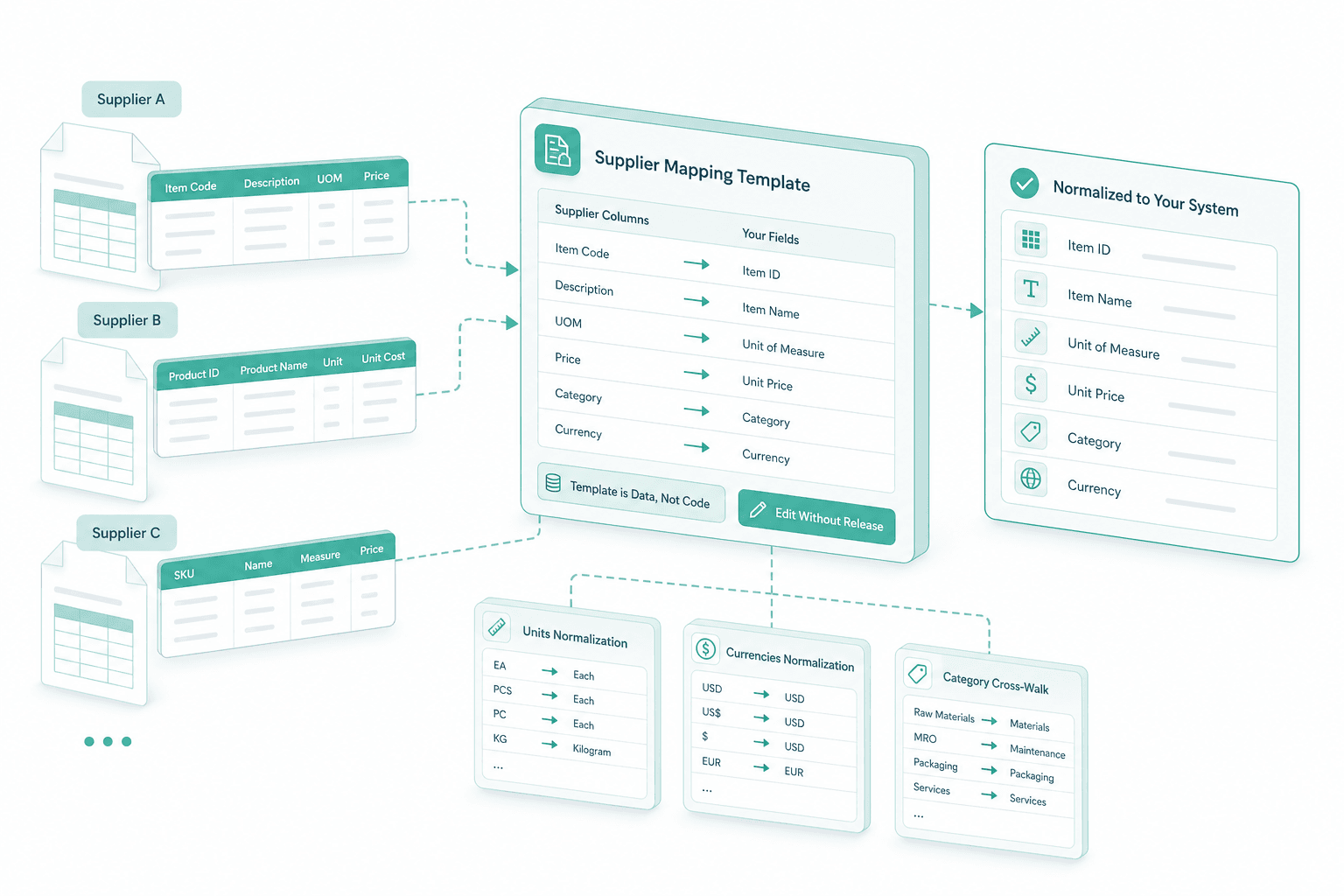
For each supplier we build a reusable mapping template: their column names mapped to your fields, units and currencies normalized, category vocabulary cross-walked. The template is data, not code — edited without a release.
Portal and drop-zone
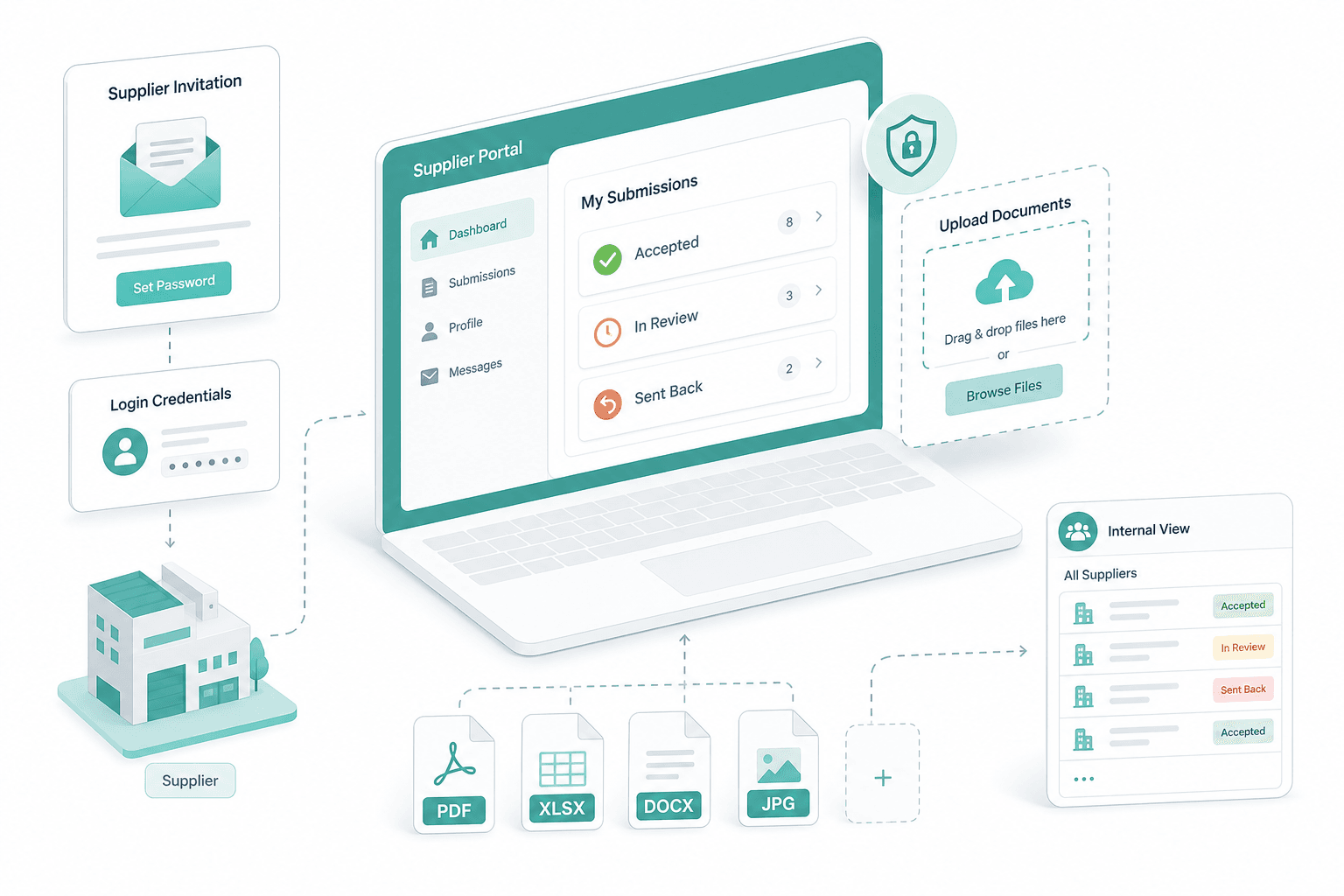
We stand up the supplier-facing drop-zone and the role-scoped portal. Each supplier gets credentials, an upload surface and visibility into their submissions — accepted, in review, sent back. Internal users see all suppliers.
Extraction and mapping
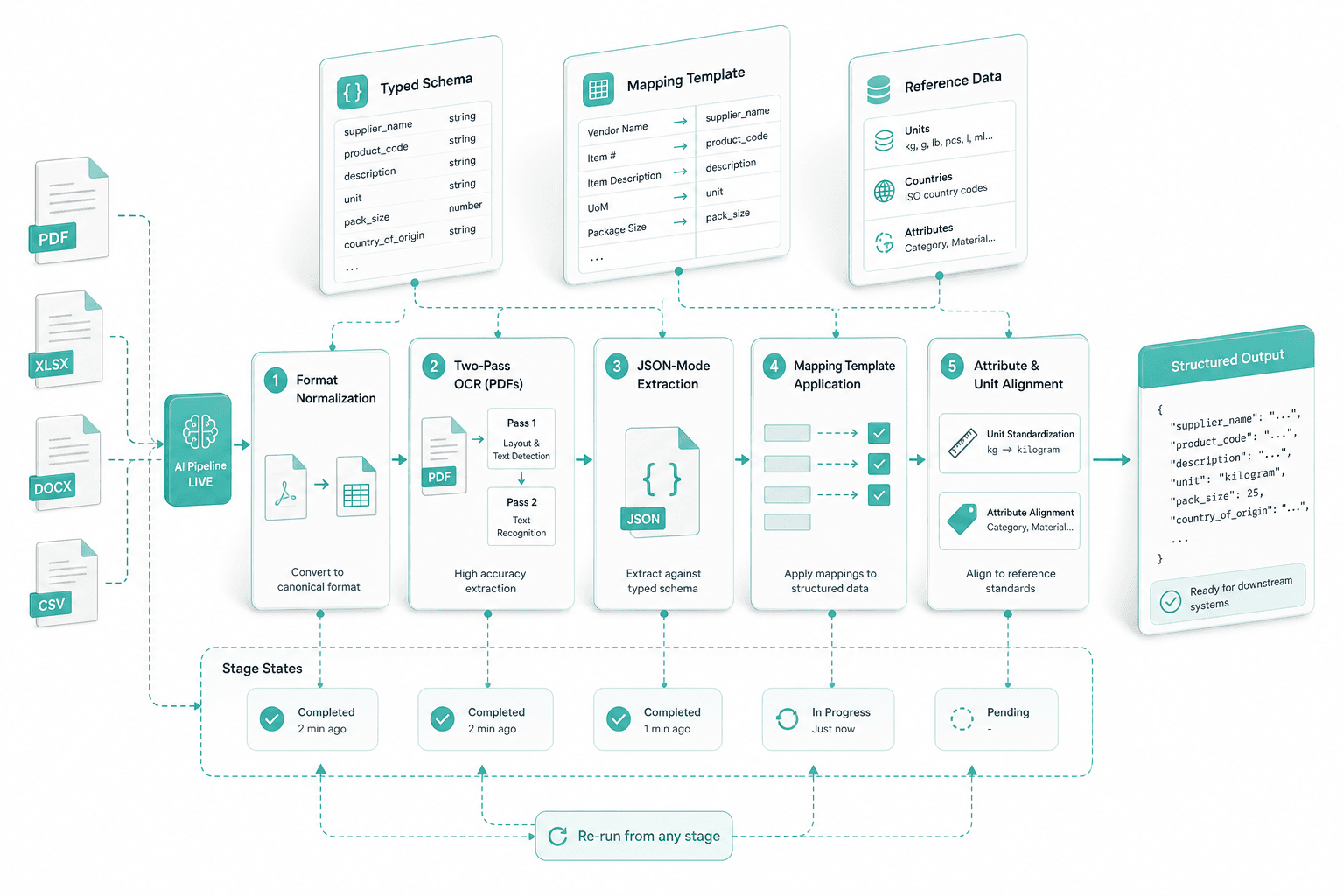
The AI pipeline goes live: format normalization, two-pass OCR for PDFs, JSON-mode extraction against the typed schema, mapping template application, attribute and unit alignment. Stage states are explicit and re-runnable.
Review split
We tune the review split with your catalog team. Supplier-fixable issues — typos, missing fields, currency confusions — bounce back with a comment. Structural and category issues stay with the internal team over websockets.
Push to PIM, hand-off
Approved rows write into your PIM, ERP or e-commerce backend on the agreed schema. On hand-off we transfer the mapping templates, the prompt registry, the role definitions and the runbook for new suppliers.
We start from your list of active suppliers, the format each one sends today, and the channel — Excel, FTP, PDF, portal upload. From there we agree the intake mode per supplier and the canonical schema.
For each supplier we build a reusable mapping template: their column names mapped to your fields, units and currencies normalized, category vocabulary cross-walked. The template is data, not code — edited without a release.
We stand up the supplier-facing drop-zone and the role-scoped portal. Each supplier gets credentials, an upload surface and visibility into their submissions — accepted, in review, sent back. Internal users see all suppliers.
The AI pipeline goes live: format normalization, two-pass OCR for PDFs, JSON-mode extraction against the typed schema, mapping template application, attribute and unit alignment. Stage states are explicit and re-runnable.
We tune the review split with your catalog team. Supplier-fixable issues — typos, missing fields, currency confusions — bounce back with a comment. Structural and category issues stay with the internal team over websockets.
Approved rows write into your PIM, ERP or e-commerce backend on the agreed schema. On hand-off we transfer the mapping templates, the prompt registry, the role definitions and the runbook for new suppliers.
Selected engagements
WEITA AG
Weita Supplier Onboarding Workflow: Wholesale Digital Transformation

How SAPIENTROQ built a Laravel and Next.js workflow that turns PDFs, emails, images and spreadsheets into compliant PIM products for Weita AG, with Mistral OCR, OpenAI JSON-mode extraction and a database-backed prompt registry.
View Case
Treat the supplier as a co-worker
The supplier is a separate role in your system
The old model is: the supplier emails a file, your catalog manager fights it into shape, and the supplier never sees what happened. We stopped treating the supplier as a data source and started treating them as a co-worker — a separate role with its own editing surface in the same system the internal team uses. Their corrections land in the same record your team approves, on the same websocket session.
Mapping is data, not code
Every supplier names their columns differently and every catalog team renames theirs over time. We model the supplier-to-catalog mapping as a persisted template per supplier — versioned, editable by operations, applied on every subsequent file. A new column does not crash the pipeline; it surfaces as a question your catalog team answers once.
HITL on the rows that earn it
Most rows from a known supplier on a known mapping write through without a human. The rows that earn review are the ones that look new — a price that jumped 30%, a unit that does not match the SKU family, a category your taxonomy has never seen. Reviewer time goes to the rows that change the catalog, not the rows that repeat last month.
Audit-grade for Swiss catalog teams
Every row carries the supplier ID, the source file, the mapping template version, the prompt version and the reviewer if one touched it. For Swiss DPA and GDPR posture we deploy on Swiss-resident hosting or on-premises; the provenance trail is on by default, not bolted on for a compliance review later.
Frequently Asked Questions
A generic importer expects a schema-conformant file. Real supplier files are not — names differ, formats range Excel to PDF, units and currencies mixed. This engine handles the messy middle: per-supplier mapping templates and a HITL queue. See catalog migration.
For each supplier we persist a mapping template — Art-Nr, SKU, Artikelnummer all bound to your canonical product-code field; units and currencies normalized; category vocabulary cross-walked. Reusable on every file from that supplier, editable without a release.
PDFs run through two-pass Mistral OCR — raw text first, then a structured pass that preserves tables and column boundaries. The text feeds OpenAI JSON-mode against your typed schema, so the model produces the row shape your PIM expects. Same engine as document data extraction.
The split is configurable per project. Light errors — typos, missing fields, currency confusions — bounce back to the supplier with a comment. Structural issues — unmapped attribute, unresolved category, price jump — stay with your internal catalog team over Reverb websockets.
Suppliers authenticate against the role-scoped portal — credentials per supplier, visibility limited to their own rows. Email-gateway intake is supported for legacy suppliers; the address is supplier-bound so files cannot be forged. All traffic is HTTPS, uploads virus-scanned.
Swiss data residency is available — deployment on Swiss-resident hosting, EU hosting or on-premises depending on your DPA posture. Records carry full provenance: source file, mapping version, prompt version, reviewer. See master data cleansing.
About SAPIENTROQ


Interested in a solution?
We are glad to show you various options without any obligation.

Roland Kurmann
CEO, SAPIENTROQ

